
Last updated: October 13, 2026
Key Takeaways
- Hallucinations are made-up facts, fake citations, invented page relationships, or confident recommendations that do not match the site.
- The agent needs a source of truth because an LLM will fill gaps with plausible language if you leave gaps in the task.
- Keep prompts narrow, explicit, and easy to test.
- Human review must sit after the agent produces a draft and before anything publishes.
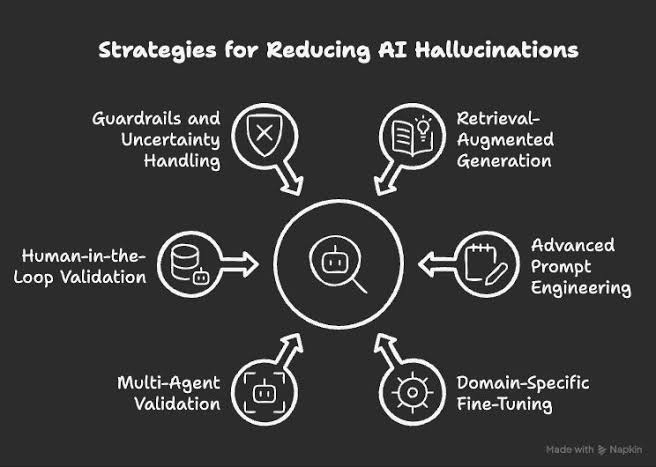
Quick Answer: in most SEO automation workflows, the safest setup is 3 controls — a source of truth, a constrained prompt, and human review before publish. Hallucinations in SEO automation agents are harder to avoid when the task is broad, the inputs are loose, or the output can publish without checks. The fix is not “better prompting” alone; it is tighter inputs, narrower tasks, explicit source checks, and a human approval step before anything touches a page, title tag, or internal link.
What hallucinations look like in an SEO agent
Hallucinations are made-up facts, fake citations, invented page relationships, or confident recommendations that do not match the site. In SEO automation, that usually shows up as a draft title tag based on a keyword the page does not target, a schema field filled with nonsense, or an internal link suggested to a URL that does not exist.
The key here is the difference between a useful synthesis and an invented claim. A good agent might say, “This page is thin on comparison intent and needs a pricing section.” A bad one says, “Google rewards pages over 2,000 words” or “This competitor has 14 product pages” without evidence. The first is an inference; the second is fabricated certainty.
I would separate hallucinations into four buckets, as a practical working model rather than a formal taxonomy:
| Type | What it looks like | Why it matters |
|---|---|---|
| Factual invention | Made-up stats, dates, quotes, prices | Damages trust and can mislead users |
| URL invention | Nonexistent pages, bad canonicals, fake redirects | Breaks internal linking and crawl paths |
| Intent drift | Wrong search intent, wrong audience, wrong offer | Produces content that misses the query |
| SEO folklore | Rules stated as facts with no source | Creates repeated bad decisions at scale |
For an SEO automation agent, the question is not “Can the model be creative?” For guidance on risk controls, consult a qualified SEO or content operations professional and compare your process with vendor documentation such as the OpenAI prompting guide and Google Search’s content guidance. It is “Which parts of the task are allowed to vary, and which parts must be grounded in known data?” That boundary is what prevents drift.
Why the agent needs a source of truth before it writes
The agent needs a source of truth because an LLM will fill gaps with plausible language if you leave gaps in the task. The most reliable way to stop that is to make the agent read from a controlled input set: crawl data, a keyword list, product metadata, approved claims, and a URL inventory.
Here is the practical version of that setup:
-
Load only approved inputs. Check that the agent can see the page URL, target query, current H1, product facts, and a current sitemap export.
What not to do: Do not let it browse the open web and merge random snippets into your brief. -
Separate facts from instructions. Put facts in a structured block and editorial instructions in another.
What to check: Product names, prices, service areas, and dates should appear in a field, not as free text.
What not to do: Don’t hide facts inside long prose where the model has to guess what matters. -
Lock the allowed claims. Give the model a short approved-claims list.
What to check: Each claim should be traceable to a product page, policy page, or documentation page.
What not to do: Don’t permit “industry standard” as a substitute for evidence. -
Pass the exact URL set. Include canonical URLs and live internal links only.
What to check: Every link target must already exist in the sitemap or CMS export.
What not to do: Don’t let the agent invent “/blog/seo-guide-2025/” because it sounds reasonable. -
Constrain the task type. Ask for one job per run: outline, rewrite, title options, meta description, or FAQ.
What to check: The output should match the requested scope exactly.
What not to do: Don’t ask one prompt to do keyword research, content strategy, and final copy. -
Require citations where facts appear. If the agent quotes a number or external rule, it must name the source.
What to check: The claim should be tied to a source you can verify.
What not to do: Don’t accept naked facts with no provenance.
A plain text brief is where hallucinations breed. A structured brief with 6 fields is much harder to contaminate. If the agent cannot tell a claim from an instruction, it will often treat both like creative material.
How to structure prompts so the model cannot invent facts
The safest prompt is narrow, explicit, and testable in context. A loose prompt like “optimize this page for SEO and make it comprehensive” invites filler. A controlled prompt says what is allowed, what is forbidden, and what must be copied from the source set.
The visual difference is easy to spot. A weak prompt produces airy sentences and generic SEO language. A strong prompt produces a tight draft with named entities, a fixed audience, and clear limits. Notice how the good prompt has a fence around it; that fence is the whole point.
Use this prompt shape:
| Prompt element | Good version | Bad version |
|---|---|---|
| Task | “Write 3 meta descriptions” | “Improve the page” |
| Inputs | “Use only these facts” | “Use your best judgment” |
| Claims | “Do not add claims not listed” | “Be comprehensive” |
| Links | “Only use URLs from this list” | “Suggest relevant links” |
| Output | “Return JSON with fields A, B, C” | “Format however you like” |
The key is that the model should have fewer opportunities to invent than to comply.
Here is the process I recommend:
-
Define one output type. Ask for a title tag, outline, or FAQ, not all three.
What to check: The output should be easy to validate in under 2 minutes.
What not to do: Don’t mix strategy and final copy in the same pass. -
Provide a locked fact block. Include only verified details such as brand name, service area, and page purpose.
What to check: Every factual item should already exist in your CMS or docs.
What not to do: Don’t leave placeholders like “insert stat here.” -
Declare forbidden behavior. Say no new statistics, no external claims, no nonexistent pages.
What to check: The prompt should name the common failure modes directly.
What not to do: Don’t hide the rules in a giant paragraph. -
Specify evidence handling. If the task needs outside sources, require named sources and exact page references.
What to check: The model should either cite or omit.
What not to do: Don’t allow “research says” without a source. -
Set a refusal rule. Tell the agent to say “insufficient data” when a claim cannot be supported.
What to check: Silence is better than invention.
What not to do: Don’t force the model to answer every question. -
Request structured output. JSON, YAML, or a fixed table makes validation easier.
What to check: Each field should be machine-checkable.
What not to do: Don’t accept a free-form blob if a machine check is possible.
For SEO automation agents, structure is not bureaucracy. It is a guardrail against confident nonsense.
Where human review must sit in the chain
Human review must sit after the agent produces a draft and before anything publishes. If you review only the final published page, you are auditing damage instead of preventing it. The right place is the gate between generation and deployment.
I would make the review step boring on purpose. The reviewer is not there to rewrite style from scratch; the reviewer is there to catch factual drift, bad links, off-target intent, and unsupported claims. On a 5-point checklist, the reviewer should be able to reject a draft in under 10 minutes.
The most useful review lens is visible on the page itself:
- The H1 should match the target query without stuffing.
- The first paragraph should state what the page is for.
- Every claim about the product, service, or competitor should map to a known source.
- Every link should resolve to a live page.
- Every FAQ answer should stay within the verified fact set.
A human does not need to inspect every sentence with equal weight. The risky parts are predictable: numbers, names, URLs, dates, and comparisons. Those are where the model tends to invent under pressure.
If your team has only one reviewer, make the standard simple: “Would I be comfortable if this sentence were quoted back to a customer?” If the answer is no, the sentence should not ship. That is stricter than a generic spellcheck and far more useful.
What validation should happen automatically before publish
Validation should happen automatically because people miss patterns that machines can catch in 2 seconds. A good validator checks links, schema fields, headings, and allowed terms before a page goes live. That is much cheaper than cleaning up a published hallucination later.
The most effective checks are mechanical, not philosophical, when you are building a publish pipeline. A validator does not need to understand marketing nuance to know that a URL returns 404, a schema field is empty, or a citation is missing. For this reason, I would wire at least three layers of checks into the publishing pipeline.
-
Run link validation. Check every internal and external URL.
What to check: No 404s, redirect chains, or malformed URLs.
What not to do: Don’t trust the agent’s link text alone. -
Check entity allowlists. Verify brand names, product names, and approved claims against a stored list.
What to check: New names should fail the build unless approved.
What not to do: Don’t let the model “correct” a product name on its own. -
Scan for unsupported numbers. Flag any percentage, year, count, or price not tied to source data.
What to check: Numbers should map to an approved field or citation.
What not to do: Don’t allow “over 50%” just because it sounds persuasive. -
Validate schema fields. Ensure structured data contains only approved values.
What to check: Required properties should be present and valid.
What not to do: Don’t let the agent fabricate review stars or FAQ answers. -
Compare against the source brief. Diff the draft against the allowed facts.
What to check: New claims should stand out immediately.
What not to do: Don’t rely on visual reading alone. -
Block publication on failure. Failing checks should stop the release.
What to check: The page stays unpublished until it passes.
What not to do: Don’t treat validator warnings as optional.
This is the point where teams often get lazy and call it “good enough.” It is not. If the page can publish with a broken URL or a made-up statistic, the agent is effectively unsupervised.
Why RAG helps, and why it still fails without constraints
Retrieval-augmented generation helps because it grounds the model in retrieved text, but RAG alone does not prevent hallucinations. If the retrieved text is noisy, outdated, or incomplete, the model can still invent a tidy answer around the gaps. RAG reduces risk; it does not remove it.
The mistake I see most often is treating retrieval like truth. Retrieved content is only as good as the corpus behind it. If your CMS contains duplicate pages, stale pricing, or inconsistent product names, the agent will confidently echo that confusion. A search index is not an editorial standard.
The visual cue that RAG is working properly is simple: the output should point back to the retrieved source set. If the draft says, “According to the pricing page…” but your retrieval log shows no pricing page was included, something has gone wrong. The agent should be tethered to the material you actually approved.
Here is the trade-off against a fully manual process:
| Approach | Strength | Weakness | Best use |
|---|---|---|---|
| Manual writing | Strong judgment | Slow and inconsistent | High-risk pages |
| RAG-assisted drafting | Faster with grounding | Still can invent around gaps | Large content sets |
| Fully open generation | Fastest | Highest hallucination risk | Very limited use |
I would not use open generation for pages that contain pricing, legal claims, medical claims, or other high-stakes information without a qualified reviewer and a source-controlled workflow. On those pages, the cost of one hallucination is usually higher than the time saved by automation.
Drafted with AI; not yet reviewed by a person.