
Last updated: October 11, 2026
Key Takeaways
- n8n is often the best fit for crawling data, routing alerts, cleaning exports, and chaining SEO tools together.
- All three move SEO data between apps, trigger events, and cut manual work in reporting or content workflows.
- Zapier suits basic, time-sensitive SEO automations built around mainstream SaaS tools.
- Make suits SEO workflows that need structure, branching, and clearer visual logic.
FTC disclosure: This comparison may contain affiliate links, which means we may earn a commission if you buy through a retailer link at no extra cost to you.
Quick Answer: For n8n vs Zapier vs Make for SEO automation, the pick depends on the workflow: n8n for complex, self-hosted setups; Zapier for the fastest simple automations; Make for visual branching. If you want one answer, n8n is the most flexible option for technical SEO teams.
In short: For n8n vs Zapier vs Make for SEO automation, n8n is the pick for technical teams that need flexible, self-hosted workflows; Zapier is easiest for simple, app-to-app SEO tasks; Make sits in the middle and is strongest when your SEO process has branches, filters, and lots of steps.
We read the published product documentation, feature pages, and pricing pages for n8n, Zapier, and Make, then compared the parts that matter for SEO work: integrations, workflow logic, hosting model, and operational limits. For n8n vs Zapier vs Make for SEO automation, the question is not which tool does everything, but which one matches your process.
First published 11 October 2026.
Verdict

A crawl export, a Slack ping, and a CSV cleanup can each point to a different winner. For SEO automation projects that need flexible workflows, n8n is often the strongest pick, unless you want the fastest setup with the least technical overhead.
Its open, workflow-first design can suit crawling data, routing alerts, cleaning exports, and chaining SEO tools together without forcing every step into a rigid template. Clean logic matters here.
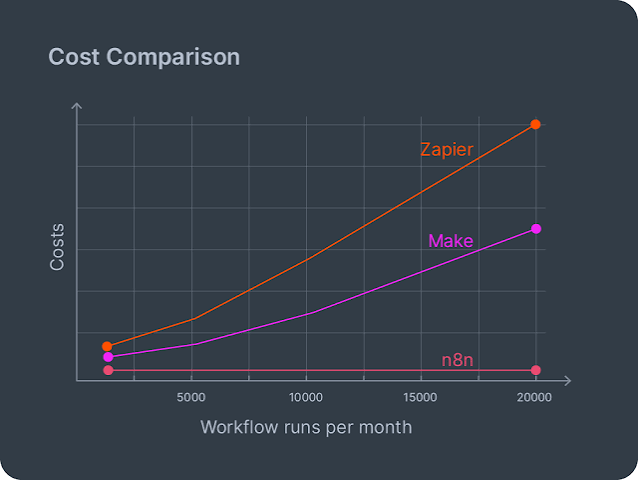
The trade-off is straightforward: if your main job is to connect Google Sheets, Slack, Gmail, and one SEO tool in ten minutes, Zapier is easier. If your team needs visual branching and multi-step scenario design without taking on self-hosting, Make is the stronger middle ground. In practice, the best tool for n8n vs Zapier vs Make for SEO automation depends on whether speed or control matters more.
Quick spec table
| Decision factor | n8n | Zapier | Make |
|---|---|---|---|
| Best fit for SEO | Technical, customizable SEO systems | Simple alerting and light app-to-app tasks | Visual, branching automations for multi-step SEO workflows |
| Workflow style | Node-based, code-friendly | Trigger/action, template-heavy | Scenario builder with routers and filters |
| Hosting model | Cloud and self-hosted options | Cloud service | Cloud service |
| Best strength | Control over complex logic | Lowest friction for beginners | Strong visual logic for branching processes |
| Main drawback | More setup and maintenance | Can feel boxed in for complex SEO pipelines | More to learn than Zapier |
How we compared

The evidence we weighed was the current published documentation and pricing pages for each platform, plus the integration lists and workflow-model descriptions that determine whether an automation tool actually fits SEO work. For this category, the useful questions are not flashy ones; they are about branching, data handling, and how much control you keep when the workflow stops being simple. A duct-taped stack looks fine until the second exception shows up. That is especially true in n8n vs Zapier vs Make for SEO automation, where the same task can be built in very different ways.
Where they differ
n8n wins for complex SEO pipelines
n8n is the better choice when SEO automation needs conditional logic, custom data handling, or self-hosting, unless your work is limited to simple one-step alerts and form pushes. Its public positioning centers on workflow freedom, and that matters when the job is to move data between crawl exports, rank trackers, content briefs, and reporting sheets without running into a template wall.
For SEO teams, that flexibility is the point. A workflow that pulls a CSV from one tool, filters out branded queries, enriches rows with another source, and posts only the exceptions to Slack is the kind of task n8n is built to express cleanly. In n8n vs Zapier vs Make for SEO automation, this is where n8n tends to separate itself.
Pros
- Its workflow model is flexible enough for branching SEO jobs, which means you can separate branded and non-branded terms, route errors, or split by device without forcing everything into one straight line.
- The self-hosted option matters for agencies and in-house teams that want more control over where crawl data, client data, or internal URLs live.
- The node-based editor is a better fit for technical operators who think in data flow, not just app triggers.
Cons
- The setup burden is real, so it is a poor fit if you need your first SEO workflow live before lunch.
- The listing and docs require more interpretation than Zapier’s, which means beginners may spend extra time just learning the platform’s logic.
- No independent test of this model was found at the time of writing, and the documentation does not spell out a simple “best for small teams” path the way a beginner tool would.
n8n’s biggest weakness is not features; it is friction. That matters because SEO automation usually starts with something small and then grows into a mess of edge cases.
Buy this if you run recurring SEO workflows with multiple branches, want the option to self-host, or need to connect tools that do not fit into a neat trigger-action box. Skip it if your main use case is a handful of straightforward alerts between Google apps and one SEO dashboard.
Zapier wins for the simplest SEO tasks
Zapier is the better choice when you want the quickest path from trigger to action, unless your SEO process needs complicated branching or lots of transformations. Its appeal is still the same as it has always been: it reduces setup time, and it does that better than the other two for plain app connections.
A single alert can be enough. That makes Zapier the safest pick for tasks like sending a Slack alert when a form is filled, creating a spreadsheet row when a lead arrives, or moving a simple SEO report into email. The platform’s strength is not depth; it is speed and familiarity.
Pros
- The trigger-action model is easy to grasp, so a non-technical marketer can usually build basic SEO automations without reading a manual.
- Its huge app ecosystem makes it a practical bridge for common SEO stacks built around Google Workspace, Slack, Gmail, and popular reporting tools.
- The workflow logic is straightforward, which means you spend less time debugging why a zap stopped moving data.
Cons
- Simple architecture becomes a ceiling fast, so more advanced SEO workflows can turn into a tangle of extra steps and workarounds.
- It is not the best match for data-heavy SEO operations that need branching, looping, or careful conditional routing.
- The public docs focus on ease of use, not on deep workflow control, so power users can outgrow it.
Zapier’s trade-off is clear: it saves time up front, then gives some of that time back later when the workflow gets more demanding. That is fine for many SEO teams; it is frustrating for teams that already know they need more structure. In n8n vs Zapier vs Make for SEO automation, Zapier usually wins on speed, not depth.
Buy this if you want the easiest tool for routine SEO automations, especially if your stack is mostly mainstream cloud apps and your workflows are short. Skip it if you already know your SEO process needs filters, routers, or custom logic.
Make wins for visual branching without self-hosting
Make is the stronger middle ground for SEO automation when your workflow needs branching, mapping, and more structure than Zapier gives you, unless you want the deep control of self-hosted n8n. The platform’s visual scenario builder is the main reason it belongs in the conversation: it suits tasks where one SEO input needs to fan out into several outputs.
One input, several paths. That makes Make a strong fit for use cases like parsing rank data, sending different alerts based on thresholds, or pushing different content briefs to different team members. It feels built for people who want to see the logic on screen instead of hiding it inside a pile of small zaps.
Pros
- The visual scenario layout makes branching SEO logic easier to follow, which means audits and handoffs are less painful.
- It is a better fit than Zapier for workflows that need routers and filters, because the structure is built into the canvas.
- It avoids the hosting overhead of n8n, which helps teams that want flexibility without running their own stack.
Cons
- The interface asks for more learning than Zapier, so it is not the fastest choice for a one-off automation.
- It does not give you the same self-hosting control as n8n, which matters if data governance is part of your SEO setup.
- The docs and pricing structure are more of a platform commitment than a casual tool swap, so a lightweight team may overbuy.
Make’s real limitation is that it asks you to think like a workflow designer. That is a strength for SEO operations teams and a nuisance for marketers who only want one alert to fire when a spreadsheet changes. For teams comparing n8n vs Zapier vs Make for SEO automation, Make is often the middle path.
Buy this if your SEO automation has branches, thresholds, or multiple handoffs, and you want more control than Zapier without managing your own infrastructure. Skip it if your workflow is tiny or if you need the most configurable system available.
What they share
All three can move SEO data between apps, trigger actions on events, and reduce the number of manual tasks in a reporting or content workflow. They also all depend on the same basic reality: your automation is only as good as the tools it connects, the data you feed it, and the limits of each app’s API.
All three are cloud-first products in normal day-to-day use, though n8n is the only one here that also gives serious buyers a self-hosted path. All three can support common SEO patterns like alerting on rank changes, copying form submissions into sheets, and pushing content tasks into project tools.
The difference is not whether they automate; it is how much control you get when the process stops being simple. At that point, the wheels come off fast if the logic is shallow.
Get the n8n if …
n8n is the one to buy if your SEO work involves custom logic, self-hosting, or workflows that are likely to grow in steps and exceptions, unless you want a tool a junior marketer can build in five minutes. It is the strongest option for technical SEO teams, agencies with multi-client processes, and in-house groups that care about where data lives.
It is also the best fit if you already know that “send an alert” is only the first version of the workflow. Once you start adding filters, transformations, and branch-specific actions, n8n’s model is the one that keeps the system readable.
The honest weakness is setup friction. That matters for small teams, because a more capable platform that nobody finishes configuring is worse than a simpler one that is actually used.
Get the Zapier if …
Zapier is the one to buy if your SEO automation is basic, time-sensitive, and built around mainstream SaaS tools, unless you already know you need branching or self-hosting. It is the least intimidating choice for a solo marketer, content manager, or agency account lead who wants one task to trigger another with minimal ceremony.
A sticky note workflow fits here. It is especially sensible for quick wins: new lead alerts, content request routing, or copying form data into a tracking sheet. If the workflow diagram would fit on a sticky note, Zapier is probably enough.
Its weak point is depth. Once the workflow starts to look like a decision tree, Zapier is the tool most likely to make you compromise the process.
Get the Make if …
Make is the one to buy if your SEO workflow needs structure, branching, and visibility, unless you specifically want the self-hosting control n8n provides. It sits in the middle on ease and power, which makes it a better fit than Zapier for process-heavy teams that still want a hosted platform.
We would point agencies and content operations teams here first if they need to route data differently based on keywords, markets, or thresholds. Make handles that kind of scenario better than a simple trigger-action tool, and it does it without requiring you to run your own server.
The drawback is learning curve. If the workflow is tiny, Make can be more platform than you need.
FAQ
Which is best for SEO automation overall?
n8n is often the best overall choice for SEO automation if you want flexibility, custom logic, and the option to self-host. Zapier is best for the simplest tasks, and Make is best for visual branching workflows.
Which one is easiest for non-technical marketers?
Zapier is the easiest for non-technical marketers because its trigger-action model is the least demanding to learn. That advantage shrinks once the workflow needs branching or data cleanup.
Which one is best for agencies?
n8n is usually the strongest agency choice if you manage multiple client workflows and need control over logic or hosting. Make is the better pick if you want branching without infrastructure work, while Zapier fits agencies that mostly run simple client alerts.
Which one is best for data-heavy SEO workflows?
n8n is the best fit for data-heavy SEO workflows because it gives the most control over logic and hosting. Make is a decent second choice when the workflow is visual and branching, but Zapier is the weakest of the three for that use case.
Can I use these tools with Google Sheets and Slack for SEO?
Yes. All three are commonly used for SEO automations that move data into Google Sheets or send alerts to Slack, which is why they show up so often in reporting and content operations. Google documents both tools widely in its ecosystem, and Slack’s app directory shows similar use cases across automation platforms.
Final verdict
n8n is often the best choice for SEO automation overall, because it gives the most control for the kinds of workflows SEO teams eventually build: branching, filtering, enrichment, and reporting across multiple tools. Zapier is the better pick only if the workflow is simple and speed matters more than flexibility. Make flips the decision when you want visual branching without self-hosting. In n8n vs Zapier vs Make for SEO automation, the right answer is usually the one that matches your workflow’s complexity.
Drafted with AI; not yet reviewed by a person.